Vitora

Private Healthtracker

Your health, computed on your device.

Track nutrition, hydration, supplements, sleep, recovery, weight, and more — all computed on your iPhone, never sent to a server.*

*Optional AI food description is the only outbound call, and only on iPhones without Apple Intelligence — see Privacy below for details.

Get notified at launch
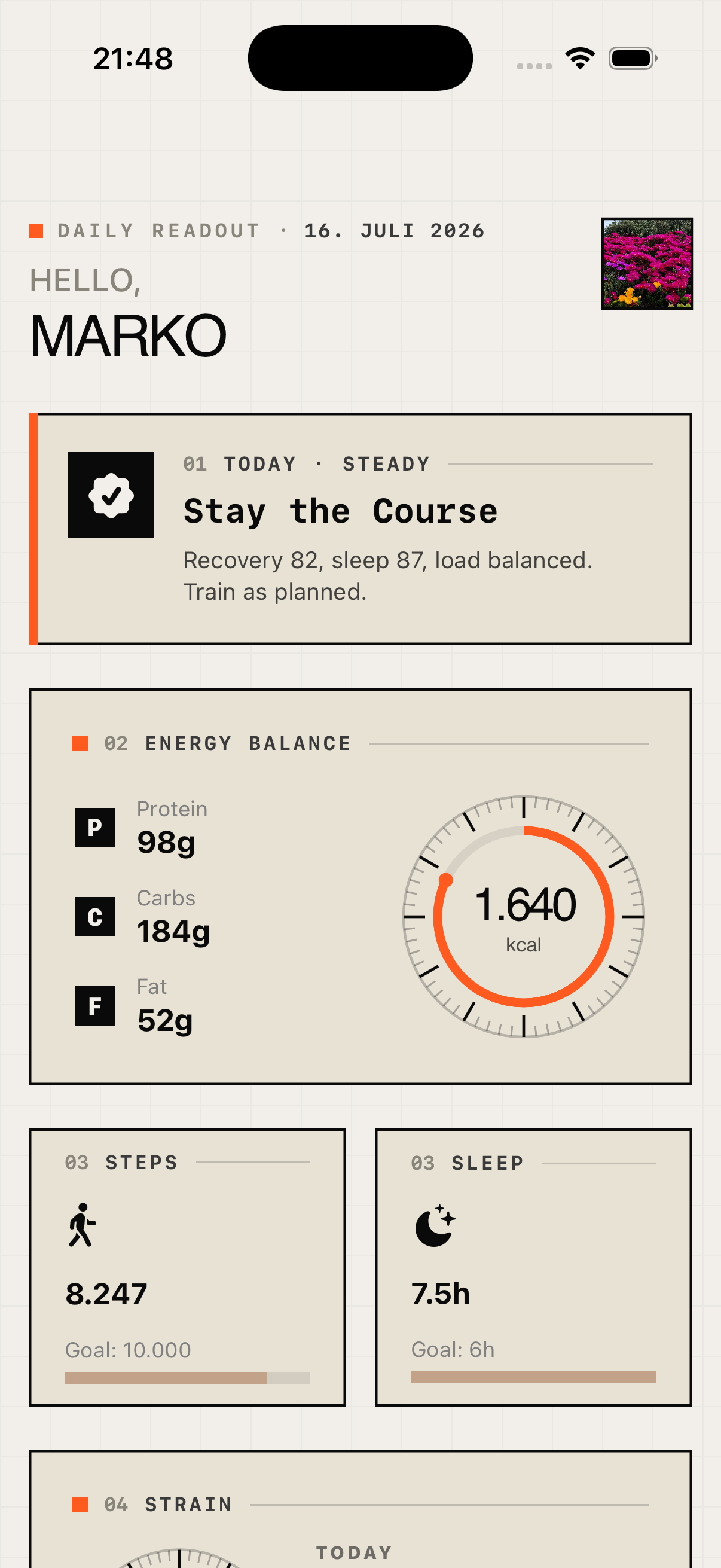
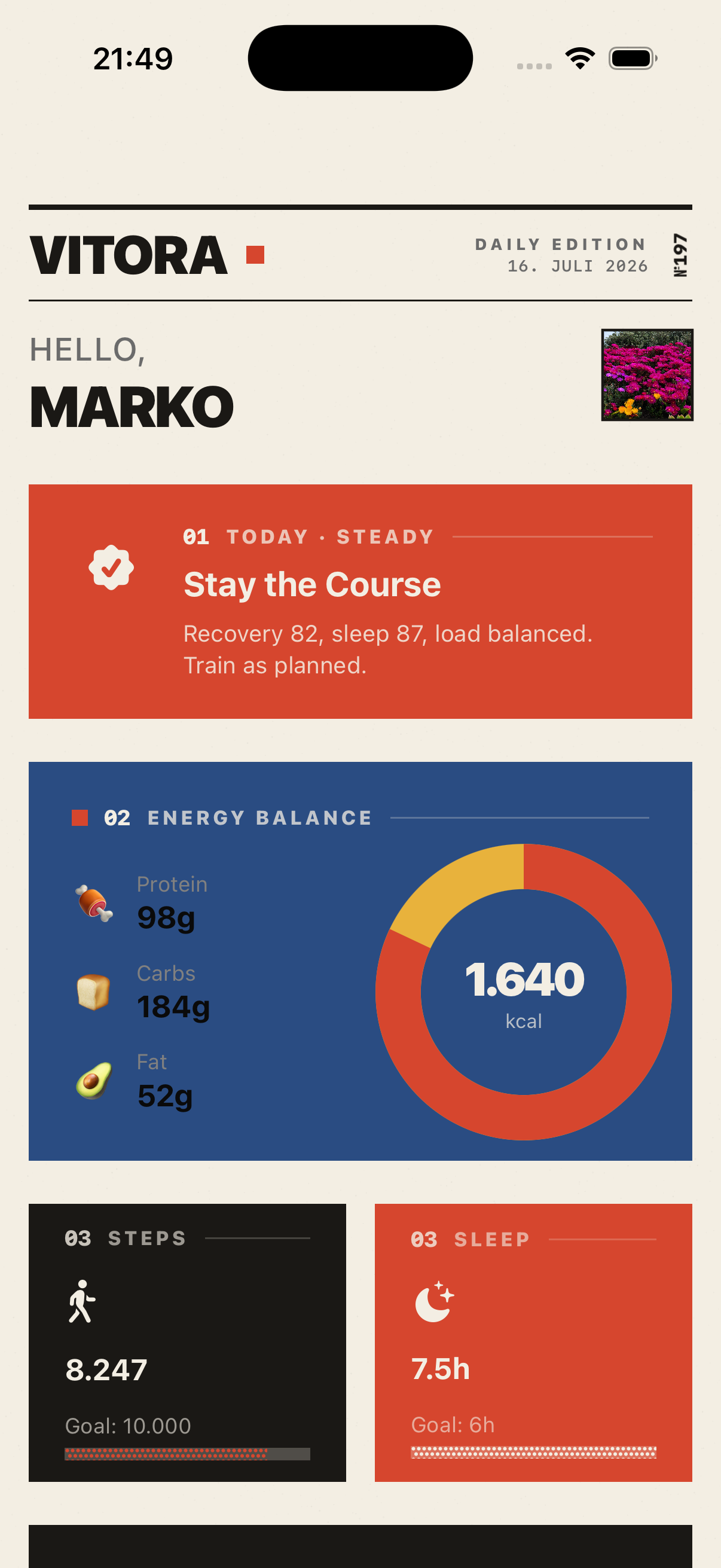
Industrial — Braun-inspired brutalism: flat surfaces, one punchy accent.

iPhone — Dashboard

Braun-inspired brutalism: flat surfaces, one punchy accent.

What Vitora does

Everything in one place

Calories, macros, hydration, supplements, weight, steps — plus heuristic scores for sleep and recovery. One opinionated dashboard, no spreadsheet required.

Privacy by default

Everything runs on your iPhone. There is no Vitora account, no server-side health data, no third-party tracking.

Designed, not skinned

Four deliberate visual themes — Black, Gradient, Industrial, and Swiss Poster. This website is the Industrial one.

What Vitora tracks

Calories

Daily balance vs your goal, with active and basal energy.

Macros

Protein, carbs, fat, sugar — logged manually, by barcode, or by AI description.

Water

Quick-add buttons; everything syncs to Apple Health.

Supplements

Your own list, taken vs total, stored only on your phone.

Weight

Trend chart with optional goal — turn it off if you don't want one.

Steps

HealthKit's daily count, with a 35-day calendar heatmap.

Calorie balance

Calories in vs energy burned, when the data exists. We never guess.

Sleep

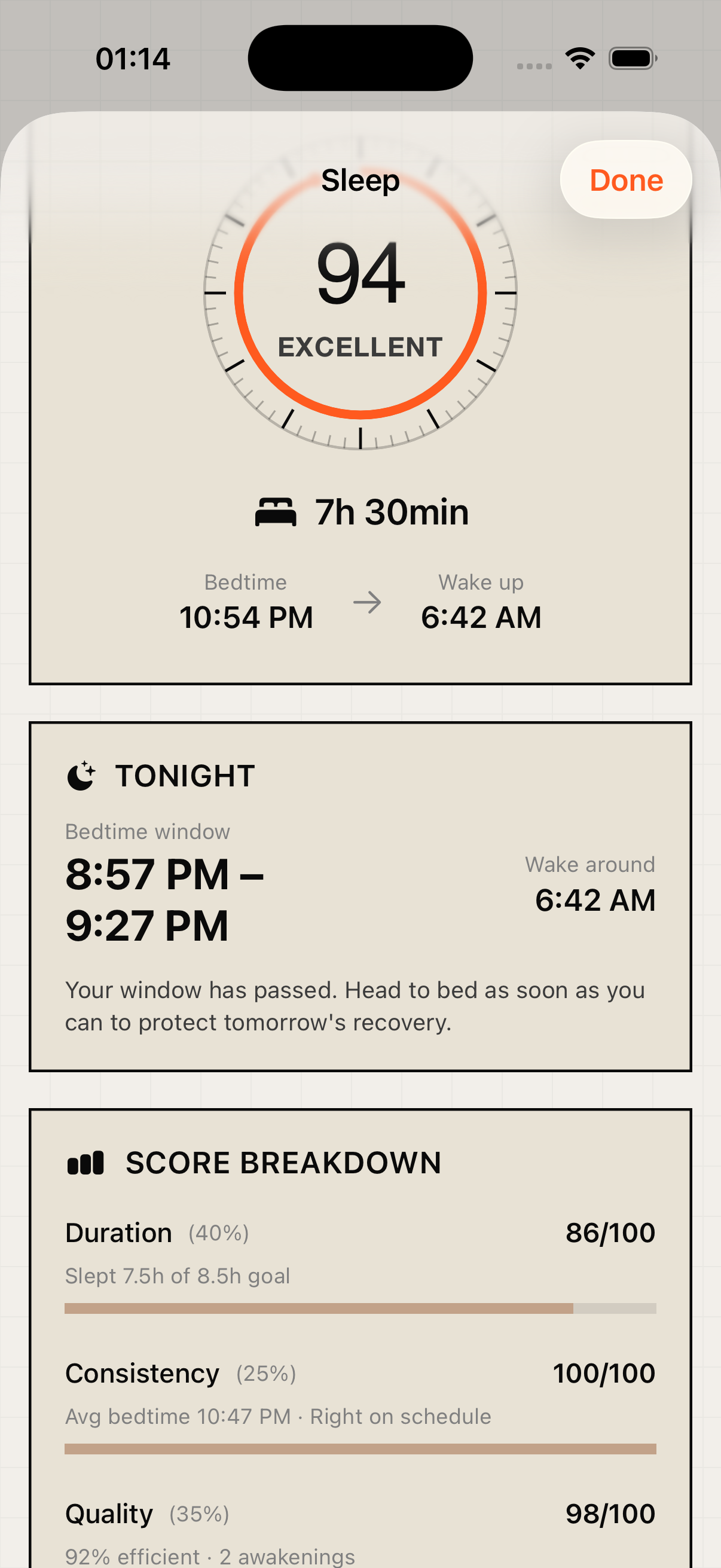
A heuristic 0–100 score from HealthKit's sleep stages — duration, quality, consistency.

Recovery

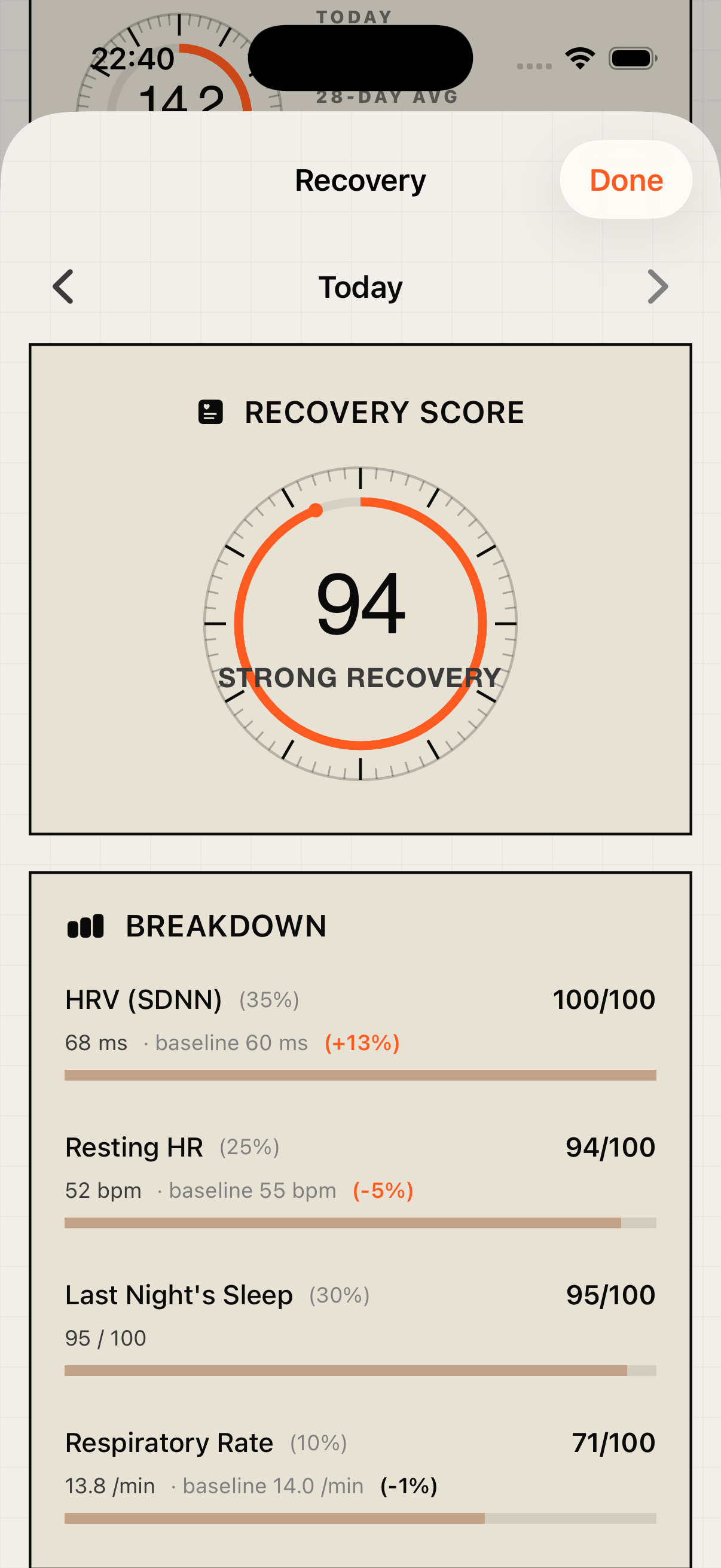
A readiness signal from HRV, resting heart rate, sleep, and respiratory rate, scaled to your own 14-day baseline.

The methodology

Every score, computed locally.

Recovery Score

0–100

HRV 35% · Sleep 30% · Resting HR 25% · Respiratory Rate 10%

Computed on-device from four signals taken from last night's sleep window — not daytime values — so stress spikes during the day don't skew the score. Each signal is graded as a z-score against your own 14-night median and personal variability, so normal biological fluctuations don't read as poor recovery. A calibration mode runs during your first nights, until enough baseline data is available. Missing signals are ignored and the remaining weights are rescaled — never replaced with synthetic placeholders.

Score bands

  • Strong recovery85–100
  • Good67–84
  • Moderate50–66
  • Low34–49
  • Very low0–33

Heuristic, not a medical diagnosis tool.

Sleep Score

0–100

Duration 40% · Quality 35% · Consistency 25%

Computed locally from HealthKit's sleep-stage data the morning after. Quality decomposes into stages, efficiency, and awakenings using thresholds from sleep-medicine literature (AASM).

Heuristic, not a medical reading.

Load

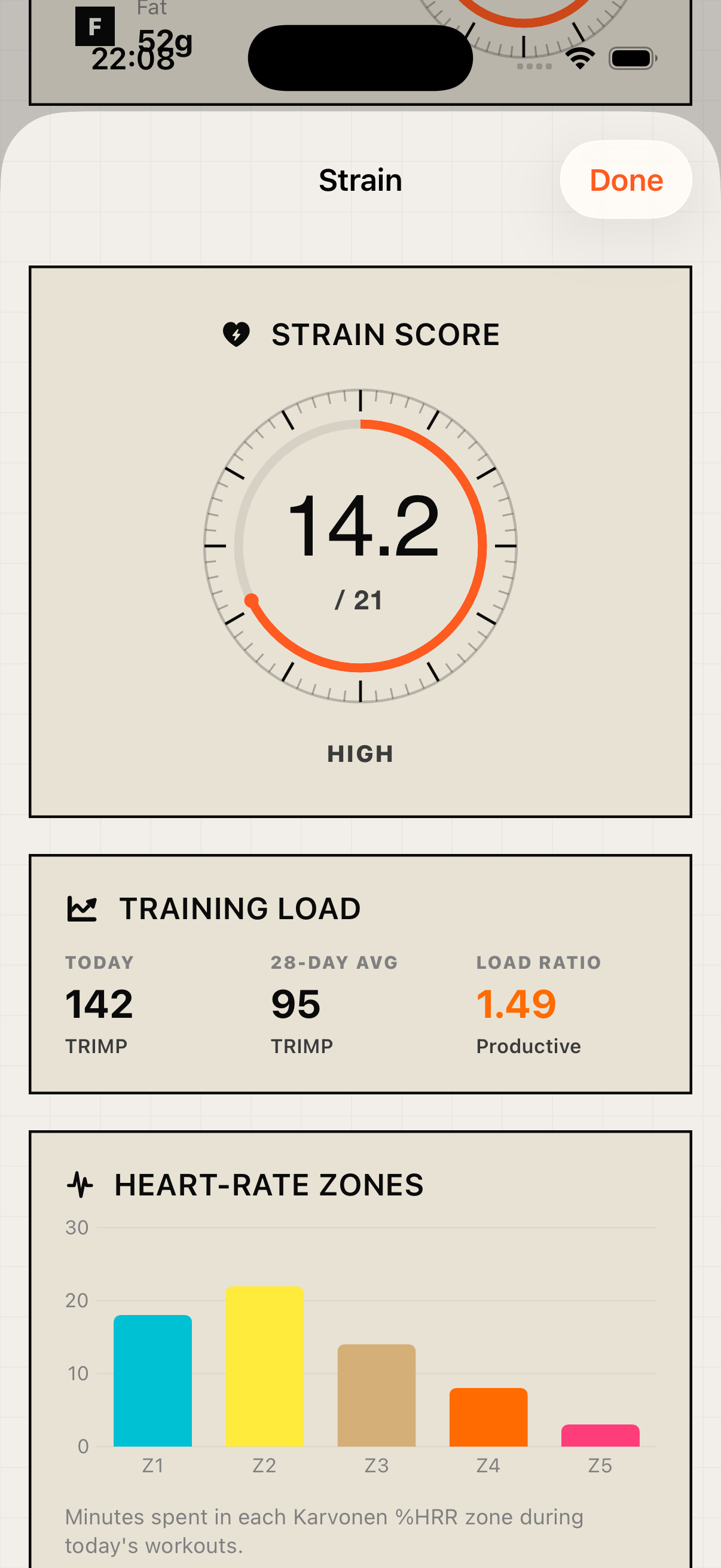
Strain Score.

021

How hard did you train today — and is that a lot or a little, relative to what your body can handle?

Open the methodology

HealthKit inputs

  • Every workout of the day (HKWorkout)
  • Per-minute heart rate inside each workout window
  • Resting heart rate for the personalised Heart Rate Reserve
  • Date of birth for the 220 − age max-HR estimate

Algorithm

  1. 01Per minute of every workout: interpolate HR from neighbouring HealthKit samples.
  2. 02Compute Karvonen %HRR: (HR − RHR) / (MaxHR − RHR).
  3. 03Bucket each minute into one of five Edwards zones (Z1 < 60% to Z5 ≥ 90% HRR).
  4. 04TRIMP = Σ (minutes in zone × zone weight). That's today's acute load.
  5. 05Chronic load = 28-day exponentially-weighted moving average of past daily loads.
  6. 06ACWR = acute / chronic. 0.8–1.3 = sweet spot · > 1.5 = injury risk.
  7. 07Total strain = log(1 + acute / 12) × 5.5, clamped to 0–21.

Qualitative bands

  • Minimal0–6
  • Light6–10
  • Moderate10–14
  • High14–18
  • Maximum18–21

ACWR is only meaningful after 14 days of training history. Until then the app shows "calibrating" instead of the ratio.

On-device from HealthKit. No cloud. No external API.

Energy

Body Battery.

0100

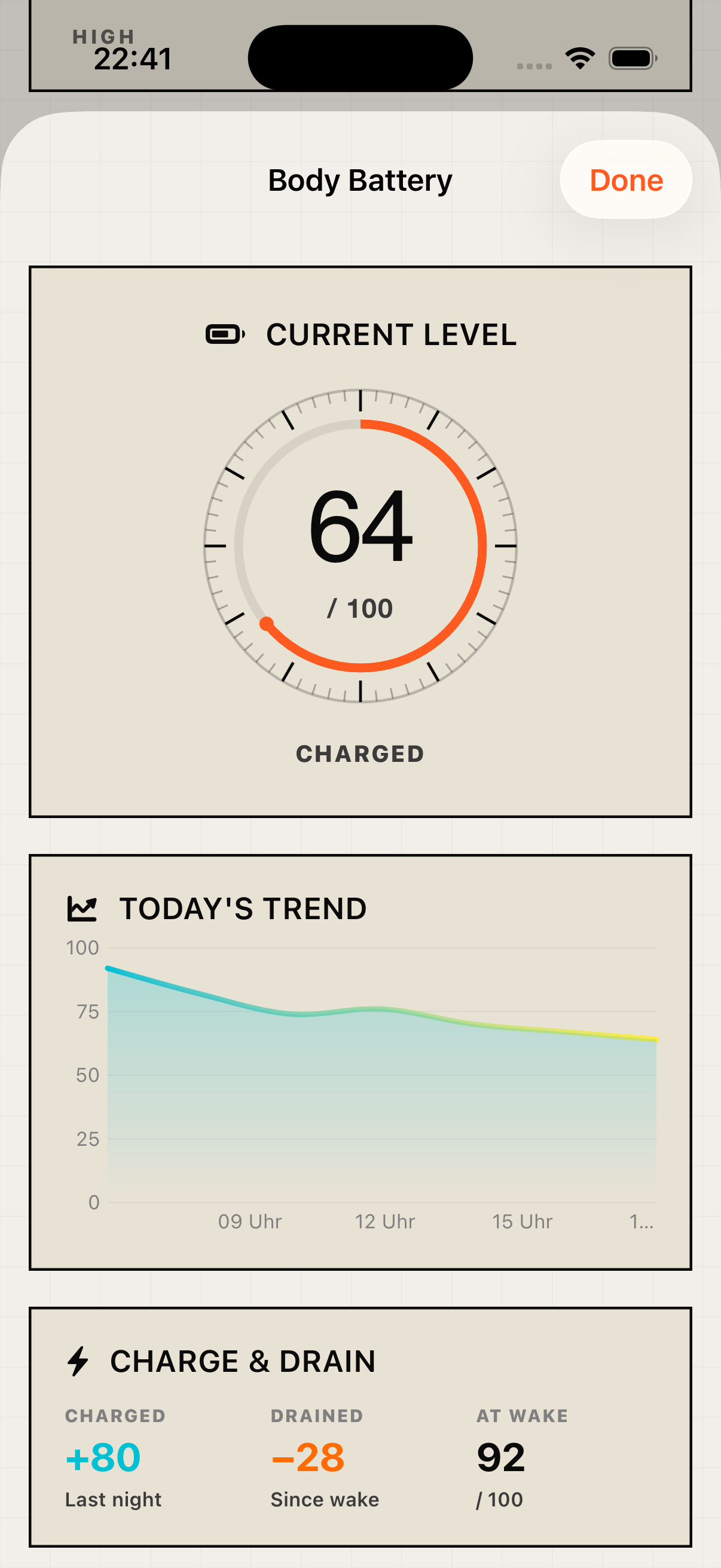
Continuous energy index. Charges in your sleep, drains across the day — the sympathetic counterpart to Strain.

Open the methodology

Charging during sleep

Charge speed is proportional to Sleep Score quality: (sleepScore / 100) × hours × 12.5 pts/h. 8h × score 100 → 100 points. 6h × score 60 → 45 points. Floor of 15 so a rough night doesn't collapse to zero.

Draining during the day

For every HealthKit HR sample the drain rate is linearly interpolated between resting heart rate (0.04 pts/min) and max effort (1.1 pts/min). A 6-BPM buffer above RHR prevents normal sympathetic tone from draining the battery while you're sitting still.

Qualitative bands

  • Low — rest/recovery0–25
  • Pace yourself25–50
  • Charged50–75
  • Fully charged75–100

A continuous energy metric like this is usually locked inside proprietary cloud engines on dedicated smartwatches. Vitora computes it openly from HealthKit data — on your iPhone, with no external service.

Daily cue

Daily Recommendation.

A rule-based engine turns the morning scores into a concrete daily cue. Eight categorical outputs, each with a transparent reason — no black-box ML.

Open the cascade

Cascade · priority top to bottom

  • Recovery still calibratingBaseline calibrating
  • Sleep debt ≥ 2 hPrioritise sleep tonight
  • ACWR > 1.5Back off today
  • Recovery ≤ 35Full rest day
  • Recovery ≤ 50Active recovery
  • Last Sleep Score < 55Catch up on sleep tonight
  • Recovery ≥ 80 + ACWR < 1.3Green light
  • DefaultStick to the plan

Every recommendation text is shown in full — you see why Vitora picked it. Deliberately different from ML-driven recommendations whose logic stays opaque.

The differentiator

Correlation Engine.

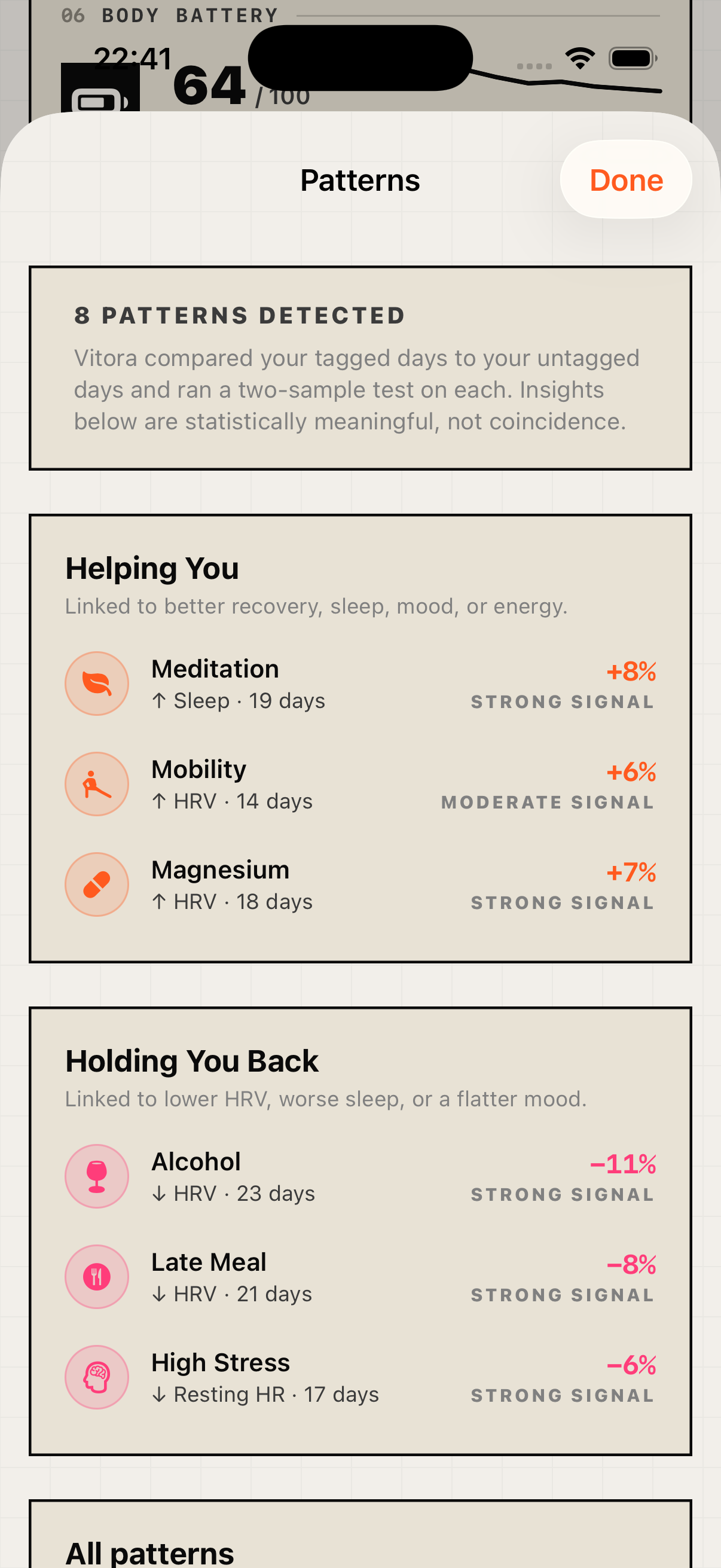
Vitora computes statistically significant relationships between your behaviour and your vitals — on the iPhone. You don't just see numbers — you see what's causing them.

Example insights

  • Alcohol → ↓ HRV by 11% next day · Strong signal · 23 days
  • Meditation → ↑ sleep duration by 8% · Moderate signal · 19 days
  • Late meal → ↓ HRV by 8% · Moderate signal · 21 days

Checked against three vital signals

  • HRV (heart rate variability)
  • Resting heart rate
  • Sleep duration

First patterns surface after 10 logged days. With a realistic 30-day history, typically 4–8 significant patterns emerge.

Open algorithm & outputs

What the UI shows

  1. 01Top 3 "helping you" — tags correlated with better HRV, longer sleep, or lower RHR.
  2. 02Top 3 "holding you back" — tags correlated with worse outcomes.
  3. 03Full list of statistically credible patterns, sorted by effect size descending.
  4. 04Each insight shows tag icon, arrow direction, outcome, percent effect, signal strength, sample size.

Algorithm

  1. 01For each (tag, outcome) pair, journal days are partitioned: tag days and control days (logged, but tag not selected).
  2. 02Mean of the outcome on the following day per group — matches the biology: alcohol in the evening → HRV the next morning.
  3. 03Welch's t-test (unequal variances) yields the probability the difference is chance (p-value).
  4. 04Surfaced when both groups have ≥ 3 days and p ≤ 0.15.
  5. 05Signal strength: Strong p < 0.05 · Moderate p < 0.10 · Weak p < 0.15.

“Every calculation runs on your iPhone. The full method is written right above  every step, in order. The patterns Vitora surfaces are something you can re-check, not something you have to take on faith.”

Inputs

Journal & tags.

Diary feature. You mark each day with what happened — alcohol, late meal, sauna, stress, type of training — plus mood (1–5) and free notes. The tags feed the Correlation Engine.

Mood scale

Bad · Low · OK · Good · Great (1–5), rendered as ascending bars.

First SwiftData integration in Vitora. Data lives in the local store on the device and never leaves the iPhone.

19 curated tags across 5 categories

Lifestyle

  • Alcohol
  • Caffeine
  • Late meal
  • High stress
  • Travel

Recovery

  • Meditation
  • Sauna
  • Ice bath
  • Mobility
  • Massage

Body

  • Sore muscles
  • Sick
  • Headache
  • Cycle day 1+

Training

  • Strength
  • Endurance
  • Yoga

Nutrition

  • Heavy meal
  • Fasted

Sunday 9 AM

Editorial Weekly Report.

A fully automated, magazine-style weekly edition. Delivered every Sunday at 9. Turns Vitora from "app I check every day" into "app I look forward to".

Week 21 · Sample

Recovery trend

Avg recovery

0

Longest sleep

0h 00m

Peak strain

0

What's in the report

1-page spread

  1. 01Masthead
  2. 02Hero stat — weekly average Recovery
  3. 037-day Recovery line chart
  4. 047-day Strain bars
  5. 05Top 3 Correlation Engine insights
  6. 06Last night's sleep hypnogram
  7. 07Weekly bests
  8. 08Footer · Computed locally · No cloud · No tracking

Auto-trigger

  • Sunday 09:00 local time: system push "Your weekly recap is ready".
  • Sunday all day + Monday until 12:00: dashboard banner at the top.
  • Once opened or dismissed, the banner disappears until the next Sunday (UserDefaults week key).

Data sources — re-uses what's already there, no extra permissions

  • Recovery trend per day of the week freshly computed via RecoveryScoreCalculator with the 14-day baseline.
  • Strain bars from the 28-day StrainHistoryStore.
  • Top 3 insights from the current CorrelationEngine.
  • Hypnogram of last night via fetchDetailedSleep (Deep / REM / Core / Awake).
  • Weekly bests distilled automatically: best Recovery, longest sleep, most steps, longest workout, highest Strain.

Swiss Poster is the showcase: 36 pt masthead with −1.5 tracking, 4 pt black rule, 120 pt hero number with −4 kerning, editorial coral as the data colour, editorial navy for baselines — pure Müller-Brockmann poster optics.

Composed locally. Push notifications are local UNCalendarNotificationTrigger instances — no push server.

Every Sunday at 9 a brand new edition. Composed locally. No cloud. No tracking.

Quiet archive

Milestones & Personal Records.

A subtle retention system without the usual gamification noise. Reads like a museum index-card archive: dense monospaced numbers, no confetti, no "+50 XP" floaters. Vitora detects milestones automatically from your HealthKit data and stores them forever.

All milestones & records

15 automatically detected milestones · 6 categories

Recovery

  • HRV baseline established (14 nights)
  • 7-day Recovery streak ≥ 70
  • First Recovery ≥ 90

Sleep

  • First 8-hour night
  • 7-night streak ≥ 7 h
  • 14 nights archived

Training

  • First workout logged
  • 7-day training streak
  • All five HR zones in one day

Heart

  • Resting HR under 60 BPM
  • Resting HR under 50 BPM

Body Battery

  • First full charge (100)

Journal & patterns

  • First entry
  • 7-day streak
  • First statistically significant pattern detected

8 personal records with dates, updated automatically

  • Lowest resting HR
  • Highest HRV
  • Longest sleep
  • Best Recovery
  • Best Sleep Score
  • Most steps in a day
  • Longest journal streak
  • Highest Strain

Museum, not arcade. No push sound on unlock. No full-screen achievement modals. The dashboard card just shows a small "X new" pill. The full archive is only visible on tap — you decide when you want to look.

An archive of your progress. Not a game. Not a reward system. Just your real personal bests — automatically detected, stored locally.

Personalisation

Customisable dashboard.

Every card on the dashboard can be arranged in any order. Daily Recommendation, Daily Balance, Protein, Activity, Strain, Recovery, Body Battery, Journal, Patterns, Water, Weight, Supplements, Milestones — all 13 slots are freely sortable.

Open interaction model

Interaction model · 1:1 like the iOS Home Screen

  1. 01Outside edit mode the cards behave like normal buttons — tap opens the detail view.
  2. 02Edit mode is activated via "Customize Dashboard" in the profile settings. No accidental long-press trigger that would block scrolling.
  3. 03In edit mode all cards wobble continuously (theme-aware amplitude and frequency; Gradient uses a slower wobble so the Liquid Glass refraction renders cleanly).
  4. 04Long-press lifts a card, drag moves it.
  5. 05Vertical scrolling still works. Auto-scroll kicks in at the top or bottom edge.
  6. 06The "Done" button persists the new order.

Technical

SwiftUI's native .draggable and .dropDestination APIs (iOS 16+) — the same system mechanisms Apple uses in Reminders, Files and Home Screen customisation. Auto-scroll at the scroll view's edge comes for free. The order is stored in UserDefaults via a versioned key; new cards in later builds append to the end without discarding the user's layout.

On your home screen

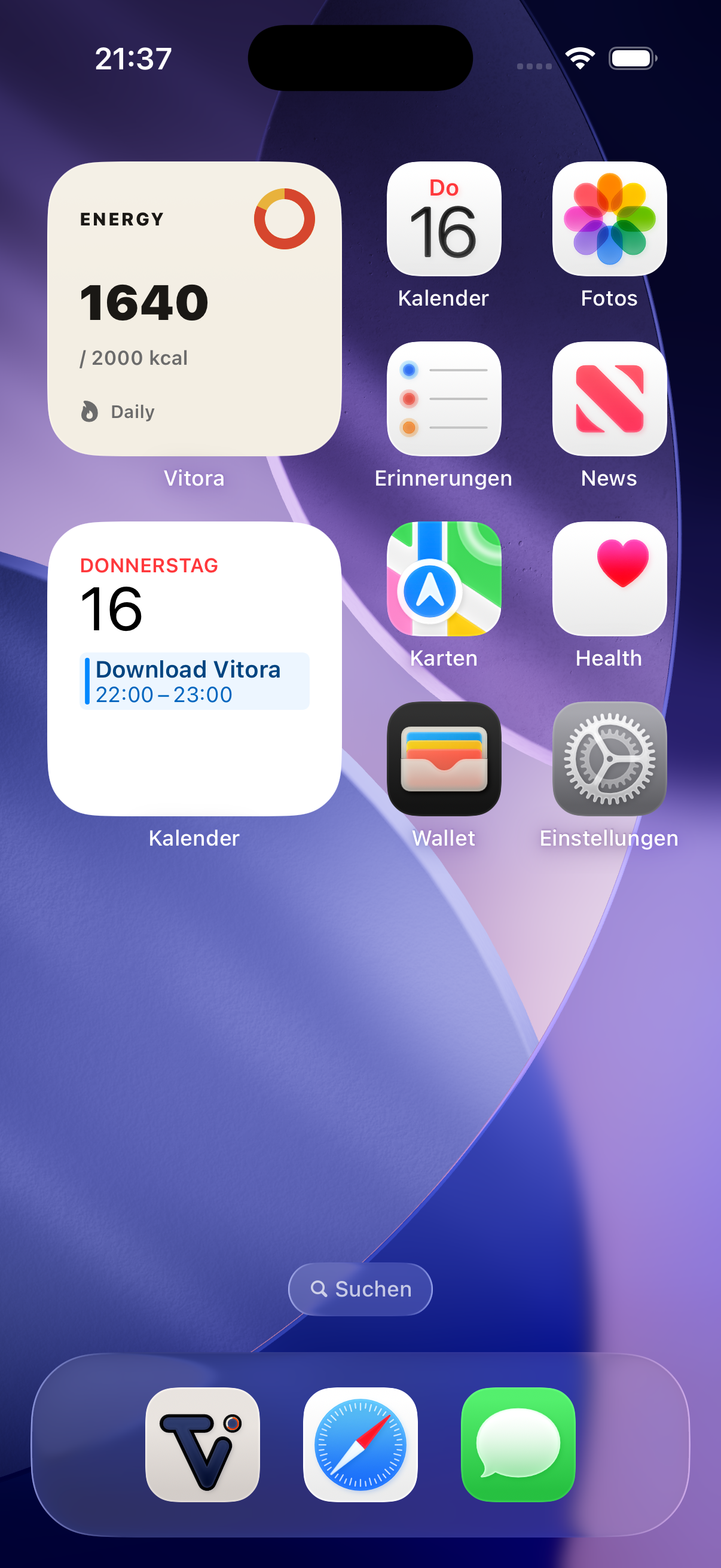
Medium widgets

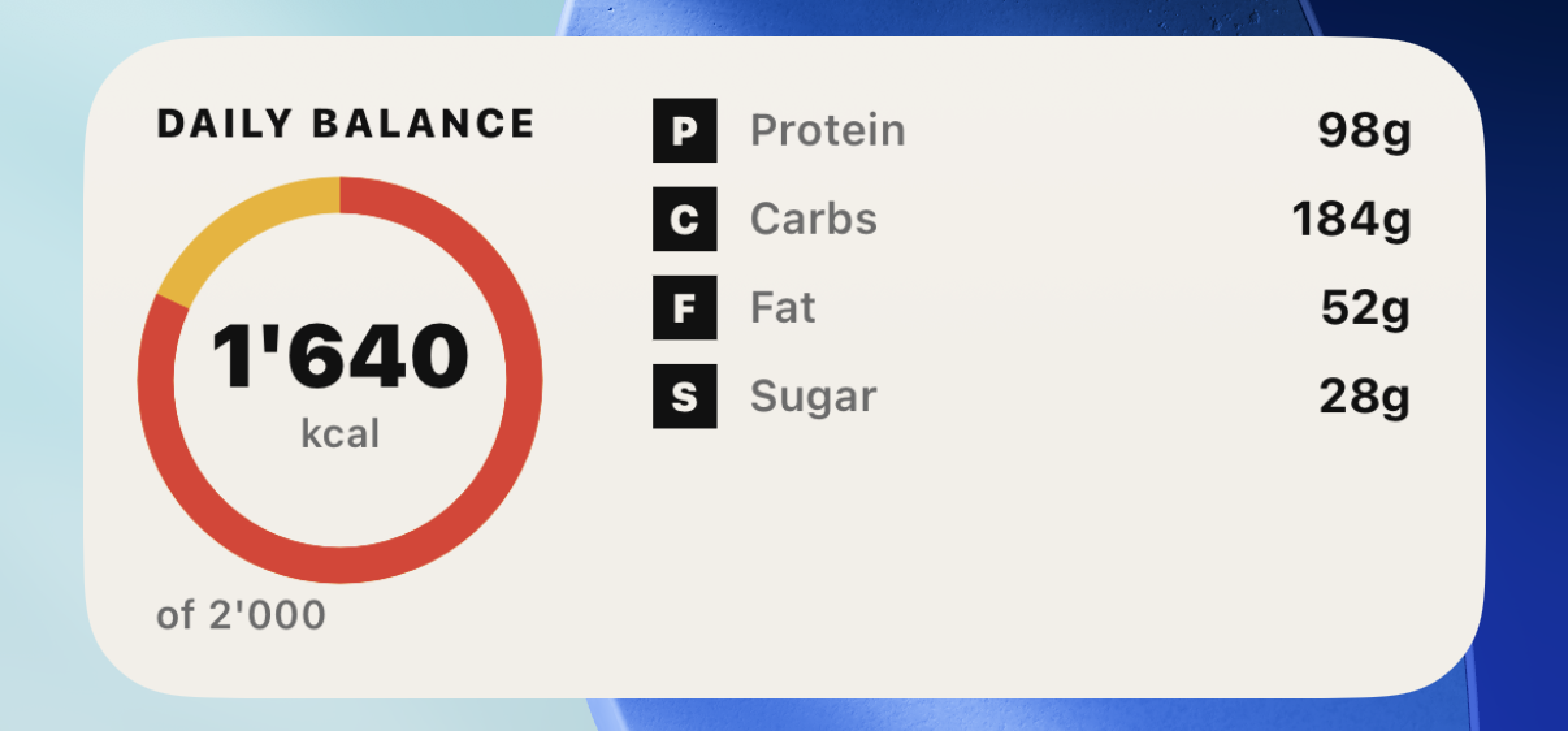
Daily Balance

Daily Balance

Calories and macros at a glance, with your daily target.

Vitora Metric

Vitora Metric

Pick any score or metric — calories, recovery, sleep — and pin it to your home screen.

Morning Vitals

Morning Vitals

Last night's Sleep and Recovery scores, side by side.

Large widget

Full Dashboard

Full Dashboard

Every score and metric — the full picture in one widget.

Personalisation

Each widget's edit sheet has a Card Colour Picker with eight colours from the Swiss Poster palette — Paper, Red, Amber, Navy, Ink Black, Cream, Mint, Lilac. Only takes effect under the Swiss Poster theme; other themes keep their own widget background. Widgets also adapt correctly to iOS 26 tinted and transparent Home Screen modes via widgetRenderingMode.

Privacy by default

Your data stays on your phone.

  • 01

    All score calculations run on device.

  • 02

    Apple Health is the only source of truth — Vitora reads from it and writes back what you log.

  • 03

    No Vitora server stores your health data. There is no account.

AI food description is opt-in. On devices that support Apple Intelligence, the text you type is processed directly on your iPhone — nothing leaves the device. Only when your iPhone does not support Apple Intelligence is the text sent to Google Gemini for nutrition analysis. Vitora does not store it.

Designed, not skinned.

The same dashboard, four deliberate visual languages. Choose the one that suits your taste — switch any time.

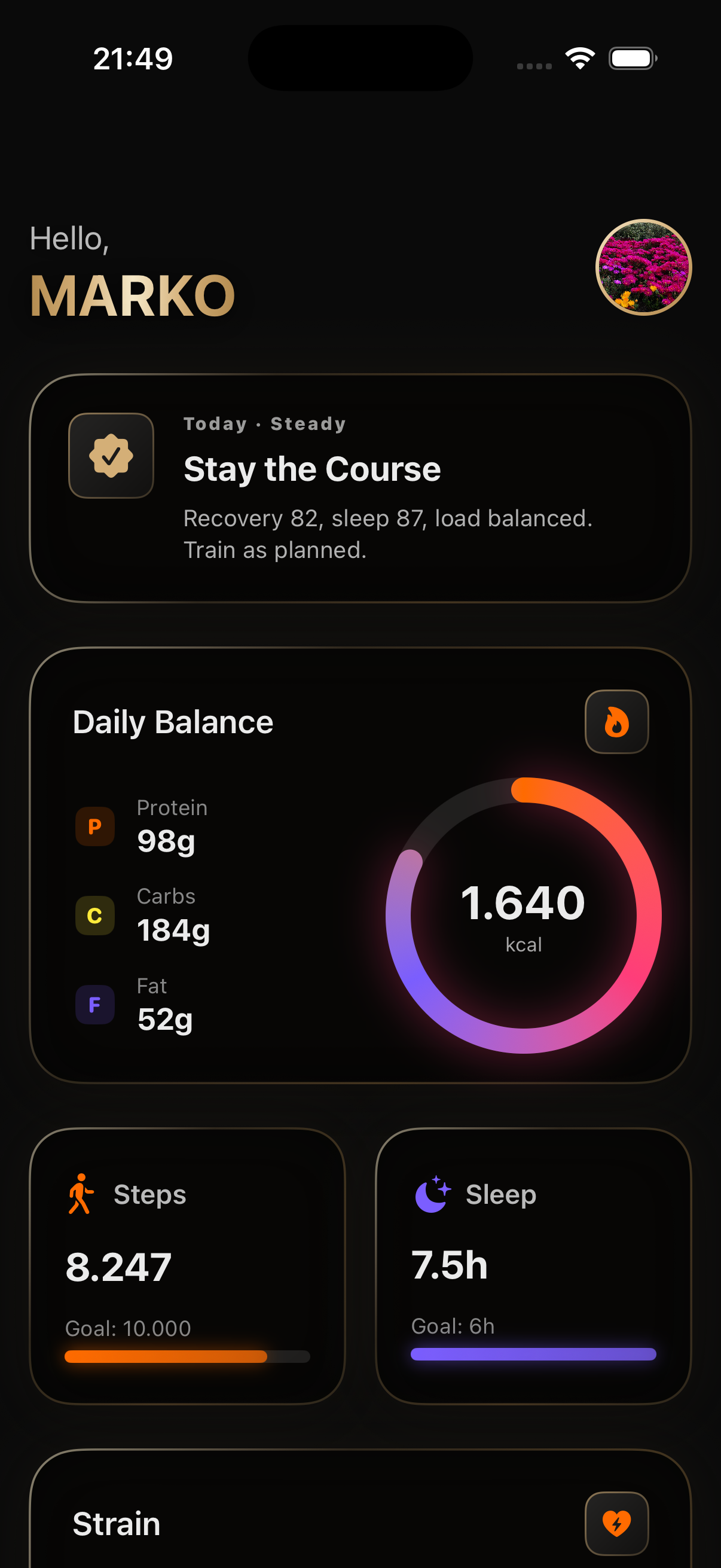
Black — Minimal solid black — every pixel earns its place.
BlackMinimal solid black — every pixel earns its place.
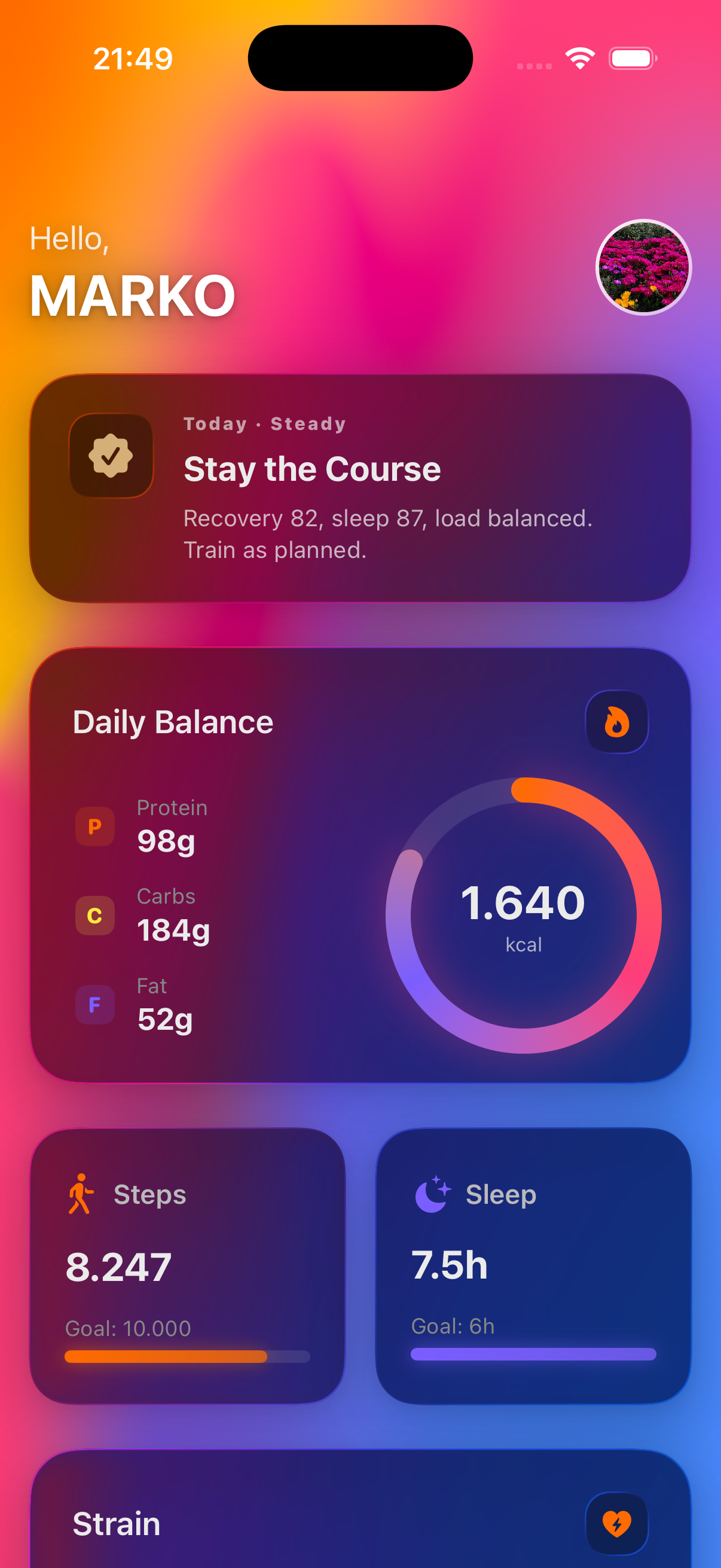
Gradient — Animated mesh gradient with Apple's native iOS 26 Liquid Glass.
GradientAnimated mesh gradient with Apple's native iOS 26 Liquid Glass.
Industrial — Braun-inspired brutalism: flat surfaces, one punchy accent.
IndustrialBraun-inspired brutalism: flat surfaces, one punchy accent.
Swiss Poster — Mid-century editorial print — cream paper, bold colour blocks, ink typography.
Swiss PosterMid-century editorial print — cream paper, bold colour blocks, ink typography.

Industrial is the theme of this website. It's also the one Dieter Rams would have shipped.

At launch

We'll email you when Vitora ships.

One email at launch. No newsletter, no marketing list, no sharing.

Questions, answered.

Why is Vitora not a medical device?

Because the scores are heuristics — useful trend signals, not diagnoses. We name the inputs and weights so you can argue with the methodology. A medical device would need clinical validation and regulatory clearance; Vitora is a fitness companion, and we say so.

How is the Correlation Engine different from "AI insights" in other health apps?

Vitora runs a Welch's t-test per (tag, outcome) pair locally in Swift. You see the path: sample sizes, p-value, signal strength. Most other apps run their pattern detection on a server and don't publish the math. Vitora's method is written in the section above — another developer could rebuild it exactly.

Do I need a separate fitness band for the Strain Score?

No. Strain is computed entirely from Apple Watch workouts and HealthKit heart rate — Karvonen %HRR, Edwards zones, TRIMP, ACWR. The Apple Watch samples HR every 5–10 seconds during workouts anyway, which is plenty for accurate zone allocation.

What data does the app send anywhere?

Nothing, by default. All scoring runs on the iPhone. The only potentially outbound call is the optional AI food description. If your iPhone supports Apple Intelligence, the text you type is processed on-device. Only when it does not is the text sent to Google Gemini for analysis — no user ID, no health context.

Does it work without an Apple Watch?

The Sleep Score requires sleep-stage data, which today only the Apple Watch provides. Recovery similarly needs HRV and resting heart rate. You can still use Vitora for nutrition, hydration, supplements, weight, and steps without a Watch.

Is there an Android version planned?

Not currently. Vitora is built tightly around HealthKit, which is iOS-only. An Android version would require a different data source and a different product.

Will it cost money?

No — Vitora is completely free, forever. Every feature is included. No ads, no data resale, no premium tier. If it helps you and you'd like to support continued development, there's an optional “buy me a coffee” button inside the app. It never gates a feature; it's just a tip jar for the developer.

How is the Recovery Score different from Apple's Vitals?

Apple's Vitals flags individual metrics that are outside your normal range. Vitora combines HRV, resting HR, sleep, and respiratory rate into a single 0–100 readiness signal, weighted and scaled against your own 14-day median.